
Quick answer
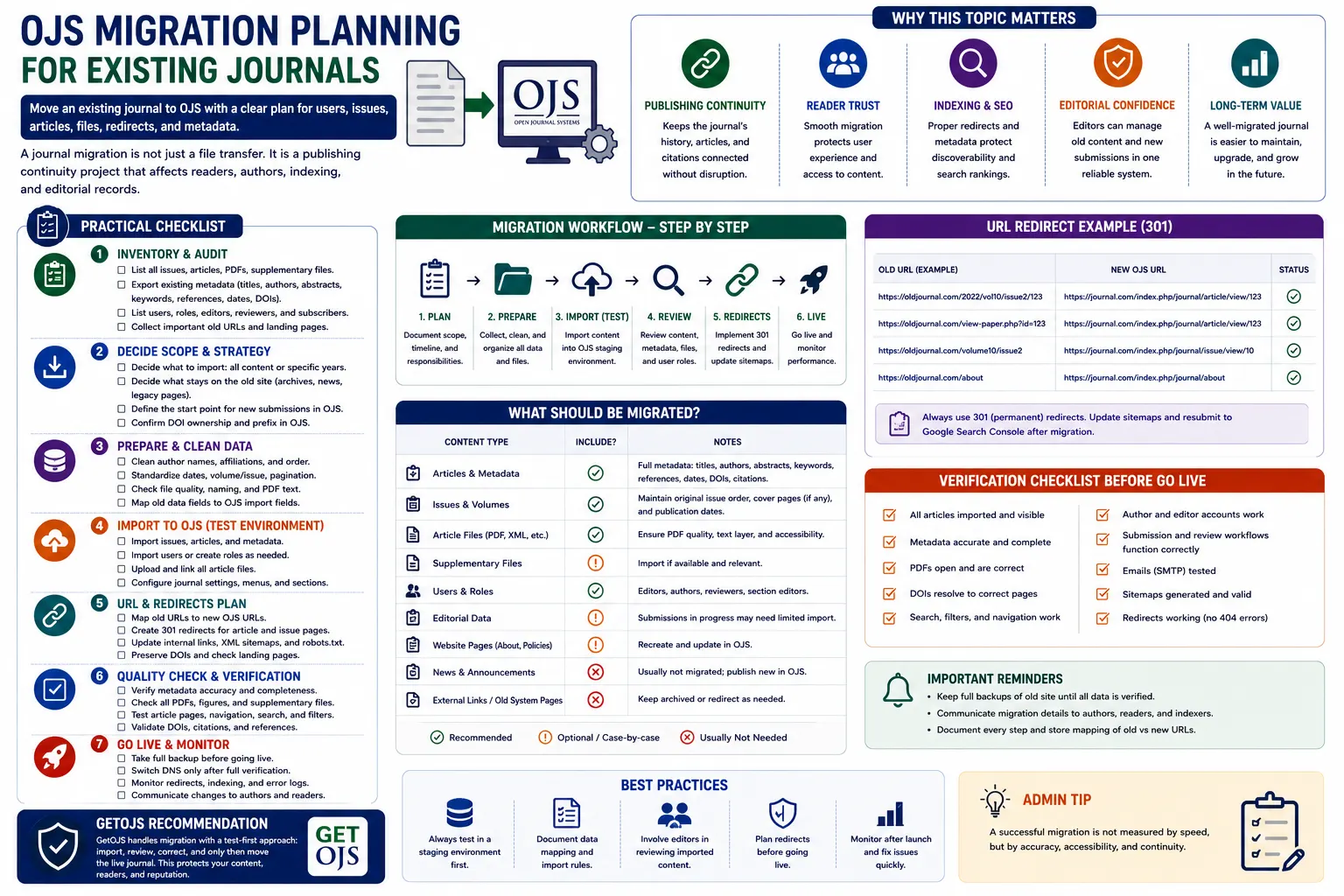
OJS migration cost and duration depend on the source platform, OJS version, number of journals, database condition, files, users, active submissions, custom code, URL changes, and testing requirements. A reliable estimate begins with a technical inventory, not an article count alone.
First identify which kind of OJS migration you need
“OJS migration” can describe several different projects. A server-to-server move keeps the same OJS application and mainly changes infrastructure. An OJS version migration combines relocation with an upgrade. A platform migration imports content from WordPress, a custom website, another journal system, spreadsheets, XML, or manually maintained archives. A multi-journal consolidation moves several independent sites into a planned institutional environment.
Each type exposes different risks. A simple hosting move may preserve the database and file structure. A legacy platform import may require metadata mapping, user decisions, article-file matching, URL planning, and manual correction. The quotation should name the migration type and define what “complete” means.
What affects OJS migration cost?
- Source and destination: OJS-to-OJS transfers are different from imports from a custom CMS or another publishing platform.
- Version path: old OJS releases may require staged upgrades, compatible PHP environments, database corrections, and extra theme work.
- Scale: number of journals, articles, issues, users, submissions, review files, galleys, supplementary files, and storage volume.
- Data quality: missing files, duplicate records, broken encodings, inconsistent metadata, invalid paths, and incomplete backups increase investigation time.
- Customizations: custom themes, plugins, authentication, payment, DOI, reports, and integrations must be reviewed or replaced.
- Validation: deeper testing of workflow history, permissions, URLs, metadata, PDFs, emails, and integrations requires more effort but reduces launch risk.
A realistic OJS migration timeline
| Phase | Work | What can delay it |
|---|---|---|
| 1. Discovery | Inventory versions, journals, data, files, plugins, theme, integrations and URLs | Missing access, unknown custom code or incomplete backups |
| 2. Test migration | Build staging, copy data, run imports or upgrades and record errors | Database inconsistencies, server incompatibility or damaged files |
| 3. Correction | Resolve metadata, theme, plugin, path, permission and workflow problems | Large manual cleanup or unavailable replacement plugins |
| 4. Acceptance testing | Test journal pages, files, roles, submissions, email, search, DOI and archives | Slow stakeholder review or unclear acceptance criteria |
| 5. Production cutover | Freeze changes, take fresh backups, migrate the delta, switch DNS and verify | Late editorial activity, DNS constraints or failed final checks |
| 6. Monitoring | Watch logs, redirects, email, scheduled tasks and user reports | Issues that appear only under real traffic or production integrations |
A provider can estimate calendar time only after understanding access, approval speed, data quality, and whether the journal must continue accepting submissions during the project.
What an OJS migration quote should include
The scope should list the journals, source system, destination version, environments, data categories, file categories, users, active submissions, themes, plugins, integrations, redirects, training, and support period. It should state whether the provider will perform a test migration and how many correction or review rounds are included.
Ask for backup and rollback responsibilities, production freeze instructions, ownership of the migrated data, deletion of temporary copies, confidentiality controls, and acceptance tests. If the proposal says only “all data will be migrated,” request a field-level checklist. Published content, editorial history, review files, user accounts, email logs, statistics, and settings may not all have the same migration method.
OJS data and files to inventory before migration
- Journal and site settings, languages, sections, masthead, policies, menus, announcements, and navigation.
- Issues, articles, titles, abstracts, keywords, contributors, affiliations, references, dates, pagination, and identifiers.
- Published galleys, manuscripts, revisions, review files, supplementary files, issue covers, and public assets.
- Users, roles, reviewer interests, editorial assignments, decisions, discussions, and active submission status.
- Theme, plugins, email templates, scheduled tasks, analytics, SMTP, DOI, ORCID, OAI-PMH, payment, and authentication settings.
- Current URLs, backlinks, DOI destinations, indexed landing pages, redirects, robots rules, sitemap behaviour, and canonical tags.
How to reduce downtime and lost editorial work
Perform at least one rehearsal on a protected staging copy. Record how long the database, files, upgrade or import, cache reset, and verification take. Before final cutover, tell editors when submissions and decisions must pause. Take a fresh database and file backup after the freeze, then repeat the documented process.
A DNS change is only one part of launch. Email, scheduled tasks, HTTPS, file permissions, storage paths, base URLs, and background jobs must also be verified. Keep the previous environment unchanged until the new site passes acceptance tests and the rollback window has closed.
Protect search visibility and DOI links during migration
Preserve article URLs whenever practical. When URLs must change, create one-to-one permanent redirects from each important old landing page to its closest new equivalent. Update canonical tags, internal links, sitemap URLs, DOI destinations, navigation, and external profiles. Do not redirect every old article to the homepage.
After launch, verify that public article pages and PDFs return the intended status, contain usable metadata, and are not blocked by authentication, robots rules, or accidental noindex directives. Search engines need time to recrawl changes, so monitoring should continue after the technical migration is finished.
Questions to ask an OJS migration provider
- Will you inspect the database and files before confirming the price?
- Is a protected test migration included?
- Which data, files, settings, plugins, and workflow records are included or excluded?
- How will you handle custom code and unsupported plugins?
- What are the production freeze, downtime, rollback, and backup plans?
- How will old URLs, DOI destinations, metadata, email, and scheduled tasks be tested?
- Who approves launch, and what post-migration support is included?
Frequently asked questions
How much does OJS migration cost?
The cost depends on the source platform, OJS versions, journal count, database and file condition, archive size, active workflow, customizations, URL work, and testing. A technical inventory is needed for a defensible quote.
How long does an OJS migration take?
A timeline depends on complexity, access, data quality, testing, stakeholder approval, and downtime requirements. Plan separate discovery, rehearsal, correction, acceptance, cutover, and monitoring phases.
Can an OJS journal be migrated with no downtime?
Some preparation can happen while the journal remains online, but a short controlled freeze is usually safest for the final database and file copy so new editorial work is not lost.
Will users and active submissions be migrated?
They can be in many OJS-to-OJS projects, but the exact records depend on source and destination compatibility. The contract should list users, roles, workflow history, discussions, reviews, files, and active statuses explicitly.
Does migration automatically improve indexing?
No. Migration can improve technical foundations, but search and scholarly indexes decide discovery independently. URLs, metadata, access, redirects, canonicals, DOI destinations, and sitemaps still need careful validation.
Official sources and further reading
Product versions, support timelines, technical requirements, and third-party policies can change. Verify current details with the responsible organization before making a production decision.
Need a scoped OJS quotation?
GetOJS can review your journal, explain the work and provide a written scope without promising third-party indexing or ranking outcomes.