
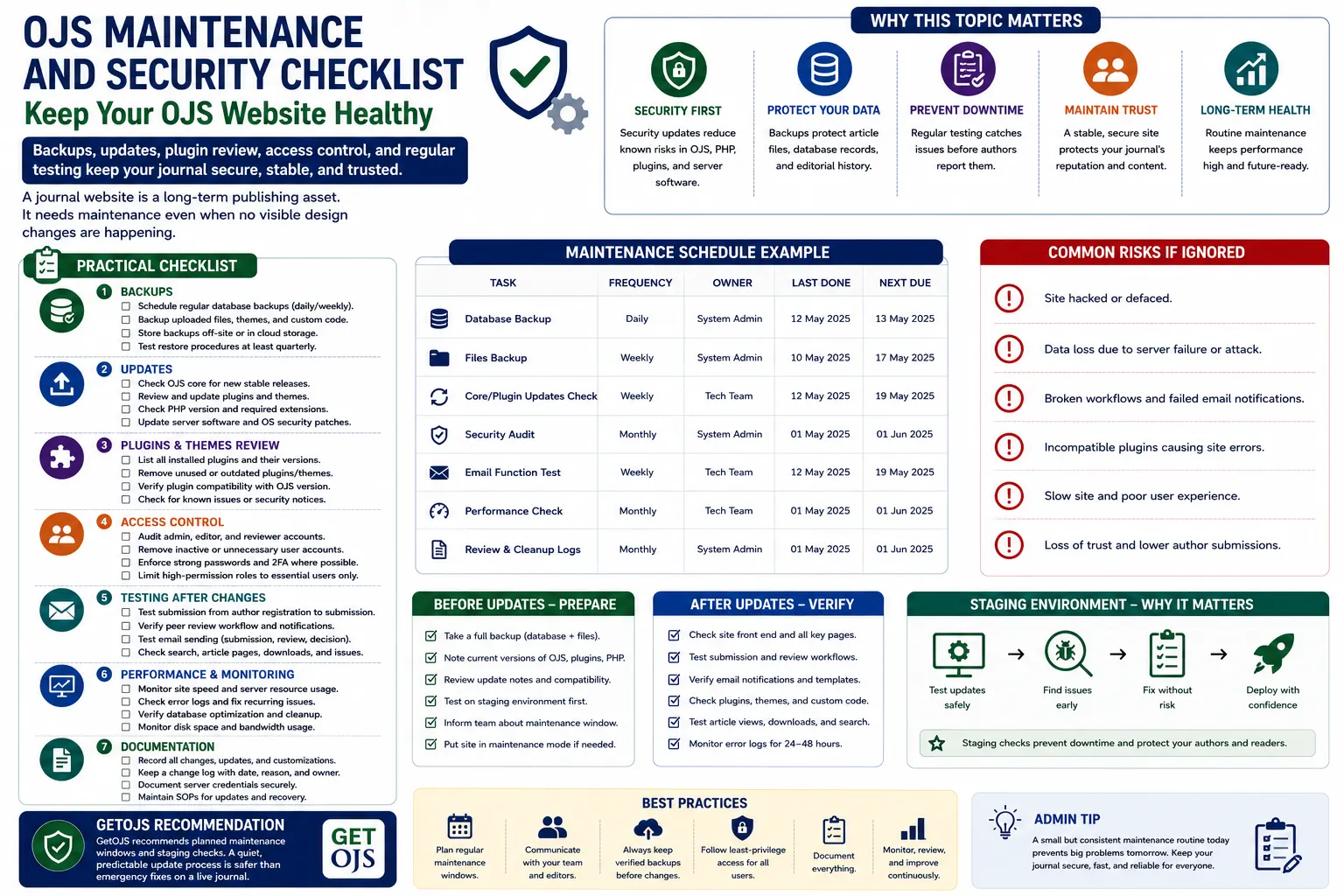
An Open Journal Systems website is not only a publishing platform. It stores article files, author details, reviewer activity, editorial decisions, issue archives, metadata, emails, user accounts, and journal history. Because of this, regular OJS maintenance and security review is essential. A journal website may look fine from the frontend, but hidden problems such as outdated plugins, weak passwords, failed backups, broken email delivery, spam registrations, or server misconfiguration can create serious issues later.
Why OJS Maintenance Matters
Many journal teams think maintenance is needed only when something breaks. This approach is risky. OJS websites need continuous care because they are used by authors, editors, reviewers, readers, and indexing services. A small issue in email delivery can stop review notifications. A broken plugin can affect metadata export. A failed backup can create data loss during migration. An outdated OJS version can create security exposure.
Maintenance should be treated as a regular publishing responsibility, not an emergency activity. A stable journal website helps authors submit manuscripts smoothly, helps editors manage workflow, helps readers access articles, and helps indexing platforms read journal metadata correctly. A secure and updated OJS website also builds trust with institutions, publishers, and academic communities.
1. Maintain Regular Database and File Backups
Backups are the foundation of OJS security and recovery. OJS stores important information in two main places: the database and the files directory. The database contains journal settings, users, submissions, editorial workflow records, article metadata, issues, email templates, and configuration data. The files directory contains uploaded manuscripts, galley files, supplementary files, review files, and other publication documents.
A proper backup plan must include both database and files. Taking only a database backup is not enough. Taking only a file backup is also not enough. Administrators should schedule automatic backups and store copies in a safe location. Backup files should not remain only on the same server because server failure, hacking, accidental deletion, or hosting suspension can make them unavailable.
- Schedule daily or weekly database backups based on journal activity.
- Backup the complete OJS files directory, public files, plugins, themes, and configuration file.
- Store backup copies outside the main server.
- Test restore procedures before depending on backups during emergencies.
2. Keep OJS Core Updated
OJS updates often include bug fixes, security improvements, compatibility changes, and workflow enhancements. Running an outdated OJS version for a long time can increase risk. However, updating OJS should not be done carelessly on a live website. Every upgrade should be planned, backed up, and tested on a staging copy first.
Before upgrading, administrators should check the current OJS version, PHP version, database version, installed plugins, active theme, and custom code changes. If the website has custom templates or modified core files, these changes may create upgrade conflicts. A proper upgrade process includes full backup, staging setup, plugin testing, theme testing, database upgrade, and final live deployment.
3. Review Plugins and Themes Regularly
Plugins and themes are useful, but they can also become a source of issues if they are outdated, unused, incompatible, or poorly maintained. OJS administrators should maintain a list of installed plugins, active plugins, disabled plugins, custom plugins, and required plugins. Any plugin that is no longer needed should be reviewed and removed carefully.
Theme maintenance is also important. Custom OJS themes may include template changes, CSS files, JavaScript files, images, and plugin-dependent display areas. After an OJS upgrade, the theme should be checked across important pages such as homepage, current issue, archive, article detail page, submission page, login page, and registration page.
- Check plugin compatibility before every OJS upgrade.
- Disable or remove unused plugins after proper review.
- Document custom theme changes for future maintenance.
- Test DOI, ORCID, indexing, payment, email, and statistics plugins after updates.
4. Audit Administrator and User Accounts
User access control is one of the most important parts of OJS security. Many older journal websites have unused administrator accounts, old staff accounts, test users, or accounts created during development. These accounts can create security risk if they have weak passwords or high-level permissions.
Administrators should regularly review all users with Site Administrator, Journal Manager, Editor, Section Editor, Production Editor, and Copyeditor roles. Any unused account should be disabled or removed after confirmation. Password policies should be improved, and administrators should encourage strong passwords. If possible, two-factor authentication or additional login protection should be considered for high-permission users.
5. Secure File Uploads and Directories
OJS websites allow file uploads during submission, review, production, and publication. Because file upload areas can be sensitive, administrators must ensure that uploaded files cannot execute as scripts. The files directory should not be publicly executable. Server rules should prevent PHP execution inside upload directories. This is especially important for older OJS installations or websites that have already faced suspicious file activity.
File permissions should be checked carefully. Directories should be writable only where required. Configuration files should not be publicly accessible. Backup files, SQL dumps, zip files, and old installation folders should not be left inside public web directories. These small mistakes can expose sensitive data.
6. Monitor Spam Registrations and Fake Submissions
OJS websites are often targeted by spam bots. These bots may create fake user accounts, submit low-quality content, send spam through forms, or overload the website. Administrators should monitor registration activity, submission activity, and unusual email patterns. CAPTCHA, email verification, moderation, and spam protection tools can help reduce fake activity.
Journals should also review author registration settings. If open registration is enabled, spam protection becomes more important. If the journal receives too many fake registrations, additional filters, firewall rules, or form protection may be needed. Regular cleanup of spam users keeps the database healthier and makes user management easier.
7. Check Email Delivery and SMTP Settings
Email is critical in OJS workflow. Submission confirmations, reviewer invitations, editorial decisions, password reset emails, copyediting messages, and production notifications all depend on email delivery. If SMTP is misconfigured, the system may show that a message was sent, but the recipient may not receive it.
Administrators should test email delivery regularly. Check SMTP host, port, encryption, username, password, sender email, reply-to email, and spam records. Domain records such as SPF, DKIM, and DMARC should also be configured properly to improve delivery. After server migration or OJS upgrade, email testing should always be included in the checklist.
8. Use Staging Before Live Changes
A staging website is a private copy of the live OJS website used for testing. It is one of the safest ways to handle updates, upgrades, theme changes, plugin changes, and server changes. Instead of testing directly on the live journal, administrators can first apply changes on staging and check the result.
Staging helps avoid downtime and unexpected errors. It is especially useful for multi-journal portals, custom themes, DOI integrations, indexing plugins, and major OJS version upgrades. Once everything is tested, the changes can be applied to the live website during a planned maintenance window.
9. Review Server-Level Security
OJS security is not limited to OJS settings only. The server environment also matters. PHP, MySQL or MariaDB, web server software, SSL certificate, firewall rules, file permissions, cron jobs, and backup storage should all be reviewed. If the server is outdated or poorly configured, the journal website can still be at risk even if OJS itself is updated.
Administrators should make sure HTTPS is active, unnecessary ports are closed, server software is updated, and error display is disabled on production. Logs should be checked for repeated failed login attempts, suspicious requests, unknown uploaded files, and unusual traffic patterns. Regular server monitoring helps detect issues before they become serious.
10. Test Important Journal Workflows
After every update or maintenance activity, important workflows should be tested. Do not assume the website is fine just because the homepage loads. OJS has many moving parts, and a small change can affect article display, email delivery, submission steps, review assignment, file upload, or issue publication.
- Test new user registration and login.
- Test manuscript submission with file upload.
- Test reviewer invitation and email notification.
- Test article page, PDF galley, DOI display, and keywords.
- Test search, archives, current issue, and announcement pages.
- Test mobile layout and menu behavior.
11. Maintain Logs and Documentation
Documentation saves time during future troubleshooting. Every OJS website should have a simple maintenance document that includes OJS version, PHP version, database version, plugin list, theme details, custom changes, backup location, SMTP settings, cron job details, and server access notes. This document should be updated whenever important changes are made.
Logs are also important. Administrators should keep a record of upgrades, plugin changes, theme changes, server changes, security incidents, and restore tests. When a problem appears later, these records help identify the cause quickly.
12. Prepare an Emergency Recovery Plan
Even with good maintenance, emergencies can happen. A website may be hacked, the server may fail, files may be deleted, or an upgrade may break the journal. A recovery plan helps the team act quickly. The plan should define who is responsible, where backups are stored, how to restore the website, how to contact hosting support, and how to inform journal stakeholders.
Without a recovery plan, teams often lose time during emergencies. With a plan, the response becomes calmer and more organized. The most important part is not only having backups, but knowing how to restore them properly.
Recommended OJS Maintenance Schedule
- Weekly: Check backups, email delivery, spam users, and server errors.
- Monthly: Review plugins, themes, admin users, logs, and storage usage.
- Quarterly: Test restore process, review security rules, and check upgrade readiness.
- Before upgrade: Create full backup, setup staging, test plugins, test theme, and verify workflows.
- After upgrade: Test submission, review, publishing, email, article pages, DOI, and indexing tools.
GetOJS Recommendation
GetOJS recommends planned maintenance windows, staging checks, full backups, and proper documentation for every OJS journal website. A quiet, predictable update process is always safer than emergency fixes on a live journal. Maintenance should be regular, structured, and handled by people who understand both OJS workflow and server-level security.
A secure OJS website protects more than code. It protects authors, reviewers, editors, published articles, journal reputation, and years of academic work. With the right checklist, journal administrators can reduce risk, improve reliability, and keep the publishing platform ready for long-term growth.
Need help maintaining or securing your OJS journal?
Our team can help configure, migrate, secure, upgrade, customize, and maintain your OJS journal website.