
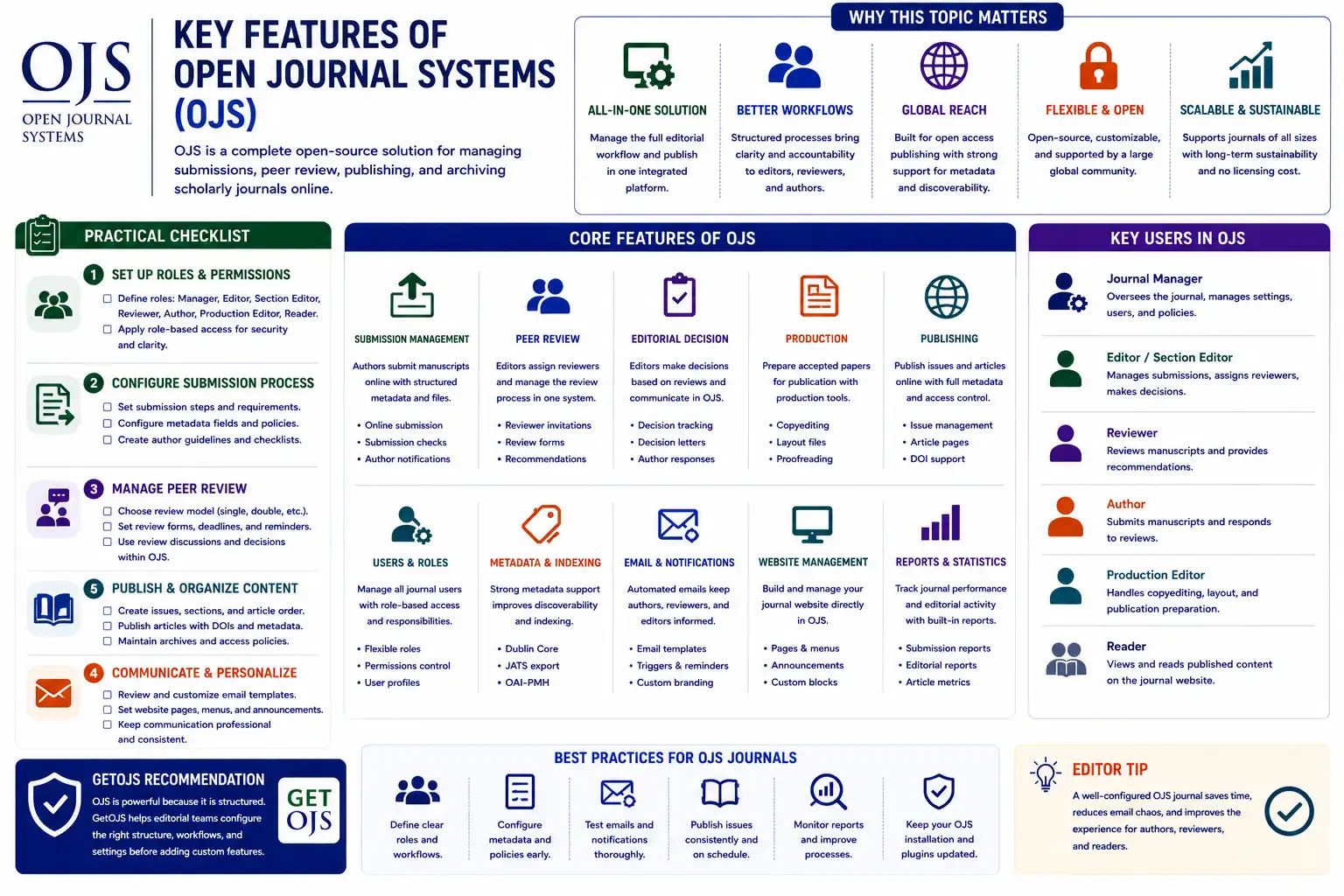
Open Journal Systems, commonly known as OJS, is one of the most widely used open-source platforms for managing and publishing scholarly journals. It brings together public journal websites, author submissions, peer review, editorial workflow, copyediting, production, issue publishing, metadata management, user roles, email communication, and indexing support in one structured system. For journal managers and editorial teams, OJS is not only a website builder. It is a complete journal management and publishing platform.
Why OJS Features Matter
A journal website should do more than show articles online. It should support the full publishing journey, from manuscript submission to final article publication. Without a structured system, journals often depend on email, spreadsheets, shared folders, and manual tracking. This can create confusion, missed deadlines, lost files, duplicate communication, and weak editorial records.
OJS solves many of these problems by giving journals one platform for submission, review, editorial decisions, production, and publication. Authors can submit manuscripts, reviewers can complete assigned reviews, editors can track progress, and readers can access published content through organized issue archives and article pages.
1. Online Manuscript Submission
One of the most important features of OJS is online manuscript submission. Authors can create an account, select a journal section, agree to submission requirements, upload manuscript files, enter metadata, add authors, and submit the manuscript for editorial review. This creates a clear record of every submission.
The submission workflow helps journals reduce informal email-based submissions. Editors no longer need to search inboxes for files or ask authors repeatedly for missing information. The system stores submission files, metadata, author information, and communication in one place.
- Structured author submission steps.
- Manuscript file upload and supplementary file support.
- Article metadata entry, including title, abstract, keywords, and authors.
- Submission checklist and author agreement support.
2. Editorial Workflow Management
OJS gives editors a structured workflow to manage each submission. A manuscript can move through stages such as submission, review, copyediting, production, and publication. Editors can assign section editors, communicate with authors, request revisions, make decisions, and track manuscript progress.
This workflow is useful because every action is connected to the manuscript record. Instead of managing decisions in separate emails, editors can see the submission history, uploaded files, review status, editorial discussions, and production files inside OJS.
3. Peer Review Support
Peer review is one of the strongest features of OJS. Editors can assign reviewers, send invitations, track responses, set deadlines, receive recommendations, and manage review files. Reviewers can accept or decline assignments and submit review comments through the system.
OJS can support different review models depending on journal policy. Journals can configure workflows for anonymous review, double-anonymous review, open review, or editorial review processes. The system helps editors keep review tasks organized and reduces the risk of missing reviewer responses.
- Reviewer invitation and response tracking.
- Review deadline management and reminders.
- Reviewer recommendations and comments.
- Support for different peer-review models.
4. Role-Based Access Control
OJS uses role-based access so every user sees only the tools they need. Site administrators can manage the full installation. Journal managers can configure journal settings. Editors can manage submissions. Section editors can handle assigned manuscripts. Reviewers can access review tasks. Authors can manage their own submissions.
This structure is important for security and workflow clarity. A reviewer should not see journal configuration. An author should not access editorial decisions for other manuscripts. A production editor should not need site-level administration. Role-based access keeps the journal organized and reduces accidental changes.
5. Issue Publishing and Archives
OJS allows journals to create volumes, issues, issue covers, tables of contents, publication dates, and archives. Published articles can be grouped into regular issues, special issues, supplements, or annual volumes. Readers can browse current issues and old archives easily.
This is useful for journals that follow a monthly, quarterly, biannual, annual, or continuous publishing model. The journal can show published articles in a structured archive, making it easier for readers, indexing services, and libraries to understand the publication history.
6. Article Pages and Galley Files
Each published article in OJS has a landing page. This page can show title, authors, abstract, keywords, DOI, publication date, issue details, citation information, references, and download links. Article galleys such as PDF, HTML, XML, or supplementary files can be added based on the journal’s production workflow.
A good article page supports readers and indexing platforms. It gives a stable location for the article and makes citation easier. Journals should make sure article pages are clean, complete, mobile-friendly, and consistent across all published content.
7. Metadata Management
Metadata is essential for scholarly publishing. OJS allows journals to manage article titles, abstracts, keywords, author names, affiliations, publication dates, issue information, DOI, references, and more. Clean metadata improves article discovery, citation accuracy, indexing readiness, and long-term journal quality.
Poor metadata can damage visibility. If author names are inconsistent, abstracts are missing, keywords are weak, or DOI fields are incorrect, indexing and discovery become harder. OJS gives journals the structure to maintain metadata, but editors and production teams must still review the data carefully.
8. Email Templates and Notifications
OJS includes email templates for important workflow communication. Authors receive submission confirmations, reviewers receive invitations, editors send decisions, and users receive password reset messages. These templates save time and keep communication consistent.
Editors should review email templates before launching a journal. The wording should match the journal’s tone and policy. A professional email template improves communication and reduces confusion for authors and reviewers.
9. Journal Website and Custom Pages
OJS provides a public-facing journal website where readers can access issues, archives, article pages, announcements, editorial board details, author guidelines, publication ethics, peer-review policy, contact information, and other journal pages. This makes OJS useful as both a workflow platform and a publishing website.
Journal managers can configure menus, static pages, journal information, logos, theme settings, and homepage content. With theme customization, the journal website can match institutional branding and create a professional public identity.
10. Plugins and Extensibility
OJS supports plugins that extend functionality. Plugins can help with DOI deposits, ORCID integration, metadata export, indexing, themes, statistics, custom blocks, payments, language tools, reviewer certificates, reports, and other features. This makes OJS flexible for different journal needs.
However, plugins should be managed carefully. Too many plugins can create maintenance, performance, or upgrade challenges. Journals should use only necessary plugins, check compatibility before upgrades, and document custom plugin changes.
11. DOI and Indexing Support
OJS can support DOI workflows and metadata exports depending on the journal’s setup and plugins. DOI management is important for stable article identification. Indexing support is important for visibility in academic databases, search engines, repositories, and library systems.
Journals should not think of indexing as a one-time task. Indexing readiness depends on clean metadata, stable URLs, clear policies, complete archives, ethical publishing practices, and reliable article pages. OJS provides many building blocks for this work.
12. Statistics and Reporting
OJS can provide useful statistics related to article views, downloads, submissions, users, issues, and editorial activity depending on configuration and plugins. Reports help journal managers understand how the journal is performing and where improvements are needed.
Statistics can support annual reports, institutional presentations, publisher reviews, and editorial planning. For example, journals may track article downloads, submission volume, reviewer activity, country-wise author reports, or issue publication history.
13. Multi-Journal Management
One OJS installation can host multiple journals. This is useful for universities, publishers, societies, and research organizations managing several journals under one platform. Each journal can have its own path, settings, editorial team, theme, policies, sections, and archives.
Multi-journal management saves infrastructure effort, but it requires careful administration. Each journal should have clean settings, correct permissions, separate public identity, and proper cache configuration so content does not mix across journals.
14. Multilingual Publishing
OJS supports multilingual journal websites and metadata. This is helpful for journals that publish in more than one language or serve authors from different regions. Journal managers can configure languages for the interface, submissions, metadata, and public pages depending on the setup.
Multilingual publishing requires careful planning. Menus, static pages, article metadata, email templates, and theme content should be checked in each language. If only some content is translated, users may see an incomplete experience.
15. Open-Source Flexibility
OJS is open-source, which gives journals flexibility and control. Organizations can host it on their own server, customize the theme, develop plugins, adjust workflows, and integrate it with other tools. This makes OJS attractive for academic publishers who want long-term control over their publishing platform.
Open-source flexibility also means responsibility. Journals need maintenance, backups, security updates, plugin review, email testing, and upgrade planning. A strong OJS setup should be supported by proper technical care.
Practical Checklist for New OJS Journals
- Configure journal title, ISSN, contact email, publisher details, and policies.
- Set up role-based access for managers, editors, reviewers, authors, and production users.
- Configure submission steps, sections, metadata fields, and author guidelines.
- Review peer-review settings, decision options, and reviewer communication.
- Prepare current issue, archive structure, article pages, and PDF galleys.
- Review email templates so communication matches your journal tone.
- Check DOI, indexing, metadata, statistics, and backup requirements.
Common Mistakes to Avoid
- Launching the journal before submission workflow and email templates are tested.
- Using too many plugins without checking compatibility and maintenance needs.
- Publishing articles with incomplete metadata or broken PDF links.
- Giving administrator access to users who only need editorial permissions.
- Ignoring backups, updates, security rules, and server maintenance.
- Customizing core files without documentation, which can create upgrade problems.
GetOJS Recommendation
OJS is powerful because it is structured. GetOJS recommends configuring the structure properly before adding custom features. A clean OJS setup should include correct journal settings, roles, submission workflow, peer-review process, email templates, metadata rules, issue publishing, article pages, theme design, plugins, backups, and maintenance planning.
The best use of OJS is not only to publish articles online, but to manage the full journal workflow professionally. When configured carefully, Open Journal Systems can help journals improve editorial control, author experience, reviewer coordination, metadata quality, indexing readiness, and long-term publishing stability.
Need help setting up or improving your OJS journal?
Our team can help configure OJS features, submission workflow, peer review, themes, plugins, DOI settings, indexing readiness, migration, and maintenance.