
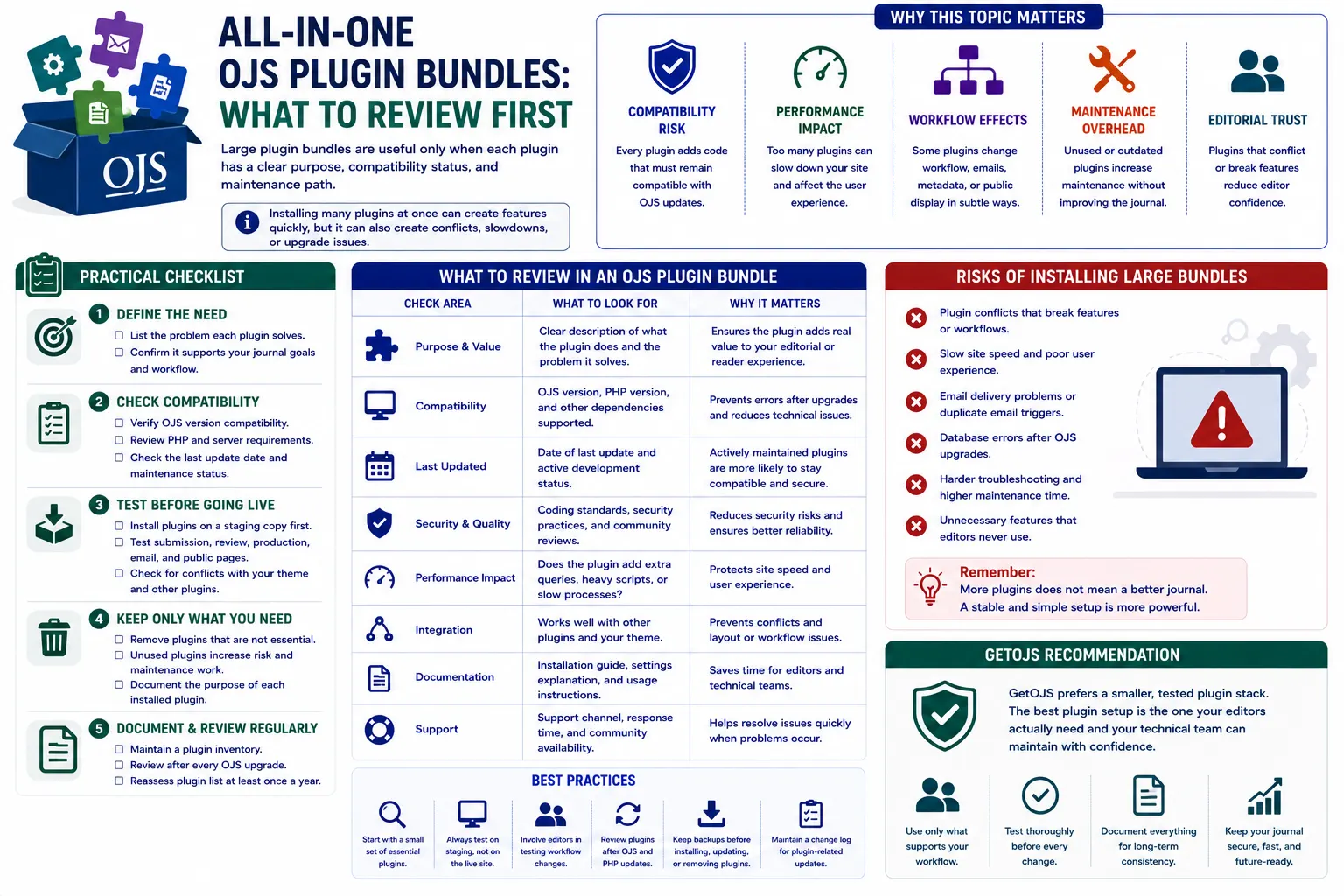
All-in-one OJS plugin bundles can save time for journal teams, but they should never be installed blindly. A useful bundle is not the one with the highest number of plugins; it is the one that solves real editorial, publishing, metadata, indexing, security, reporting, and reader-experience problems without creating long-term maintenance risk.
Introduction
Open Journal Systems is flexible because it allows journals to extend the platform through plugins. A single plugin can add a small display improvement, connect metadata to an external service, improve statistics, support indexing, add workflow actions, or enhance the public article page. Because of this flexibility, many journal owners look for an all-in-one OJS plugin bundle when they want to launch a new journal quickly or improve an existing journal website. This approach can be helpful, especially for publishers who manage many journals and want a standard toolkit across all installations.
However, plugin bundles also need careful review. Each plugin adds extra code, settings, database interaction, and possible compatibility requirements. If the bundle is installed without checking purpose, version support, source quality, update history, and real journal needs, it can make the website slower, harder to upgrade, and more difficult to debug. A professional OJS setup should not be overloaded with every available plugin. It should include only the plugins that support the journal’s publishing goals and can be maintained safely over time.
Why this topic matters
- Every plugin adds code that must remain compatible with the installed OJS version and future OJS upgrades.
- Unused plugins increase maintenance work without improving the journal’s editorial process or reader experience.
- Some plugins change emails, article display, metadata exports, submission forms, review steps, statistics, or public pages in ways that are not immediately visible.
- A poorly reviewed plugin bundle can create conflicts between theme files, custom templates, indexing tools, and third-party integrations.
Review the purpose of each plugin first
The first review should be simple: identify the exact problem each plugin solves. If a plugin does not have a clear purpose, it should not be installed on the live journal. For example, a DOI plugin has a direct publishing purpose because it supports article identification and citation. An indexing metadata plugin may be useful when a journal needs to expose data to a specific indexing or discovery service. A statistics plugin may help editors understand readership and article performance. But a plugin that only sounds useful without matching a real requirement can add confusion.
Create a small plugin review sheet before installation. Add the plugin name, purpose, responsible user, required settings, OJS version compatibility, and whether it affects the public website, editorial workflow, submission process, or system performance. This document helps technical teams, editors, and journal managers understand why the plugin exists. It also becomes useful during migration, upgrade, troubleshooting, and security review.
Check OJS version compatibility
Compatibility is one of the most important checks for any OJS plugin bundle. A plugin built for OJS 3.3 may not work correctly on OJS 3.4 or OJS 3.5. In some cases, the plugin may install but fail later when a specific page loads, when an editor saves settings, when metadata is exported, or when a scheduled task runs. This is why the review should not stop at successful installation. The plugin should be tested against the exact OJS version used by the journal.
Before installing a bundle, check the plugin source, release notes, branch name, documentation, and issue history. If the plugin is from a trusted source and has active maintenance, it is usually safer. If the plugin has not been updated for a long time, it may still work, but it needs deeper testing. For journals planning an upgrade, compatibility should be checked twice: once for the current OJS version and once for the target upgrade version.
Review maintenance and update history
A plugin bundle is not a one-time installation. It becomes part of the journal’s technical environment. This means the plugin should have a maintenance path. When OJS releases security updates, PHP versions change, database behavior changes, or theme structure changes, plugins may also need updates. A plugin with no maintenance history can become a future blocker.
Review who developed the plugin, when it was last updated, whether it has documentation, and whether the code is publicly available or privately maintained. If the plugin is custom-developed, confirm who will support it after installation. If the bundle is provided by an OJS service partner, ask whether future compatibility support is included. The best plugin bundle is not only feature-rich; it is also supportable.
Test the bundle on staging, not live
Never install a large plugin bundle directly on a live journal without testing. A staging copy protects the production website from unexpected errors. The staging site should match the live environment as closely as possible, including the same OJS version, PHP version, database version, enabled theme, custom templates, file permissions, and important settings. After installing the bundle, test all common user journeys.
For the public side, check the homepage, current issue, archive page, article details page, PDF galley view, search page, announcement page, and static pages. For the editorial side, test submission, review assignment, editorial decision, copyediting, production, publication, email templates, user registration, and role permissions. For administrative areas, test plugin settings pages, scheduled tasks, statistics, imports, exports, and custom forms. A plugin that works on one page can still break another part of the journal.
Check performance impact
Plugins can affect performance in different ways. Some add JavaScript or CSS to public pages. Some run extra database queries. Some load external scripts. Some process article metadata. Some generate reports or statistics. When too many plugins are active, even small performance costs can become noticeable. A slow journal website can frustrate authors, readers, reviewers, and editorial staff.
After installing a plugin bundle, compare page speed before and after installation. Check homepage load time, article page load time, PDF access, dashboard loading, and submission form performance. Also review error logs and slow query logs if available. If a plugin is useful but heavy, it may need configuration changes, caching, template optimization, or selective loading only on required pages.
Review security and source trust
Security review is essential because plugins run inside the journal system. A plugin can access OJS data, interact with files, modify templates, process forms, or connect with external services. Before adding a plugin to a bundle, confirm that it comes from a trusted developer or service provider. Avoid plugins from unknown sources, unclear download links, or packages that include unnecessary files.
Check whether the plugin handles user input safely, uses proper OJS hooks, avoids direct unsafe database queries, and does not expose sensitive information. Also verify file permissions after installation. If the plugin includes upload features, export features, API communication, or public forms, test it carefully. Security problems are easier to prevent before installation than to repair after a journal is affected.
Check workflow impact
Some plugins are not only visual or technical. They can change the editorial workflow. A plugin may add reviewer certificates, change email behavior, add author fields, support additional metadata, integrate with ORCID, expose article data, or add submission requirements. These changes may be useful, but editors and journal managers should understand them before the plugin goes live.
Before enabling workflow-related plugins, involve the people who use the system every day. Ask editors, journal managers, section editors, reviewers, and production users to test the workflow. Confirm whether the plugin improves the process or creates extra steps. A feature that looks useful technically may not be useful operationally if the editorial team does not need it.
Review indexing, metadata, and discovery plugins carefully
Many OJS plugin bundles include plugins related to metadata export, indexing, discovery, and repository integration. These are important because they affect how article data appears outside the journal website. Incorrect metadata can create indexing delays, citation issues, duplicate records, or incomplete article information. For this reason, metadata plugins should be configured with care.
Check journal title, ISSN, publisher name, article title, author names, affiliations, abstracts, keywords, references, DOI, publication dates, issue details, license information, and language metadata. If the plugin exports XML or structured metadata, validate the output where possible. For multilingual journals, test metadata in each language. For journals with custom article templates or custom fields, make sure the plugin still reads the correct data.
Review theme and display conflicts
Some plugins add blocks, buttons, widgets, article page sections, sidebar elements, or custom styles. These can conflict with a custom OJS theme if the layout is not tested. A plugin may look fine in the default theme but break spacing, colors, mobile layout, or typography in a custom journal theme. This is especially common when the site has custom header, footer, article page, or homepage templates.
After enabling display-related plugins, check the journal on desktop, tablet, and mobile. Review the header menu, sidebar, article page, footer, forms, buttons, and modal windows. Make sure the plugin does not make the design look inconsistent. For professional journals, the public website should remain clean, readable, and trustworthy even after new features are added.
Document required and optional plugins
Once testing is complete, divide the bundle into required, recommended, optional, and disabled plugins. Required plugins are essential for publishing, metadata, DOI, indexing, or core workflow. Recommended plugins add useful improvements. Optional plugins can be enabled only when needed. Disabled plugins should be removed or kept out of the active installation.
This classification helps during troubleshooting. If a page breaks after an update, the technical team can understand which plugins must stay enabled and which can be temporarily disabled for testing. It also helps during migration because the new server or new OJS version can be prepared with only the necessary plugin stack.
Practical checklist
- List the problem each plugin solves before installing it.
- Check plugin compatibility with your exact OJS version and PHP environment.
- Install and test the plugin bundle on a staging copy before using it on the live journal.
- Review public pages, editorial workflow, emails, metadata exports, statistics, and scheduled tasks.
- Disable or remove plugins that are not required by the journal team.
- Maintain a plugin inventory with purpose, source, version, settings, and support responsibility.
GetOJS recommendation
GetOJS recommends treating an all-in-one OJS plugin bundle as a reviewed toolkit, not as a one-click solution. The best setup is usually a clean and tested plugin stack that supports the journal’s real needs. A smaller, well-maintained plugin set is better than a large collection of unused features. Before adding plugins, review the journal’s publishing model, indexing goals, editorial workflow, theme design, performance requirements, and future upgrade plan.
For new journals, start with essential publishing, metadata, indexing, DOI, email, and usability plugins. For existing journals, first audit the current installation and remove inactive or duplicate tools. For publishers managing many journals, create a standard plugin policy so each journal follows a consistent and maintainable setup. This makes upgrades easier, support faster, and journal operations more stable.
An all-in-one bundle can be valuable when it is selected carefully, tested properly, documented clearly, and maintained regularly. It can help a journal improve discoverability, automate useful tasks, enhance user experience, and strengthen publishing operations. But without review, the same bundle can create conflicts, errors, slow pages, and long-term technical debt. The right approach is simple: install only what the journal needs, test everything before launch, and keep the plugin stack clean.
Need help applying this to your journal?
Our team can help configure, migrate, secure, customize, or maintain your OJS journal website.